
Next.js Architecture and Build Decisions: Technical SEO and Website Maintainability
Part 6 of the J Luxe rebuild series: the Next.js architecture decisions that improved performance, crawlability, publishing speed, and long-term maintenance during the rebuild.

Next.js Architecture and Build Decisions (Part 6)
Most website rebuilds do not fail because developers picked the "wrong framework."
They fail because technical decisions are made in isolation from SEO, publishing workflow, and launch risk.
Need website design in 48 hours?
If you need a professional website live fast for Nigeria-based or international clients, the launch offer is built for that exact use case.
Explore the full service at website design in 48 hours, see how to launch your website in 48 hours, or review the done-for-you website launch details.
That is why Part 6 matters.
In the J Luxe rebuild series so far, we have covered strategy, audit logic, SEO migration, service page conversion, and premium design without slow pages:
- Why We Rebuilt, Not Redesigned (Part 1)
- The Audit That Created the Roadmap (Part 2)
- SEO Migration Without Losing Traffic (Part 3)
- Writing Service Pages That Convert (Part 4)
- Premium Design Without Slow Pages (Part 5)
Part 6 is the build layer.
This is where we decide how the site should be structured, how content should be published, how metadata should stay consistent, and how launch changes can ship without creating unnecessary technical debt.
The point is not to impress anyone with tooling.
The point is to choose an architecture that makes rankings safer, performance easier to protect, and future updates faster to ship.
Why architecture decisions affect SEO and conversion
Founders often hear words like `Next.js architecture`, `App Router`, `static generation`, or `component system` and assume those are developer-only concerns.
They are not.
These choices directly affect:
- how fast pages load
- how reliably search engines crawl content
- how easy it is to keep metadata consistent
- how safely new pages can be added later
- how much friction the team faces during launch week
If the architecture is sloppy, those problems show up in business terms:
- rankings become unstable
- publishing slows down
- templates drift
- launch QA gets harder
- conversion pages become inconsistent
That is why we treated technical architecture as a growth decision, not just an implementation detail.
The architecture principle we used
Our rule was simple:
`Choose the simplest architecture that protects performance, crawlability, and publishing discipline.`
That sounds obvious.
In practice, it rules out a lot of unnecessary complexity.
For every technical decision, we asked:
- 1Does this make critical pages faster or slower?
- 2Does this make crawlable content easier or harder to maintain?
- 3Does this reduce launch risk or increase it?
- 4Does this help content teams publish consistently?
- 5Will this still make sense six months after launch?
If the answer was unclear, the decision was not ready.
Why we used Next.js for this rebuild
The rebuild needed four things at the same time:
- strong performance control
- predictable SEO handling
- reusable page systems
- a publishing workflow that could grow cleanly
That made Next.js a practical fit.
Not because it is trendy.
Because it gave us a stable middle ground between raw custom setup and theme-driven limitations.
What Next.js solved for this project
#### 1) Better control over rendering
We needed the main content to render in HTML clearly enough for search engines and users.
This matters for:
- homepage clarity
- service page relevance
- blog content crawlability
- metadata consistency
For SEO-heavy service businesses, critical commercial pages should not depend on client-side rendering for core meaning.
#### 2) A clean route model
We wanted a predictable URL structure that was easy to reason about during migration and future expansion.
File-based routing made it easier to keep page roles explicit:
- core commercial pages
- service routes
- blog index
- blog post templates
- utility routes like sitemap and robots
That kind of clarity reduces launch mistakes.
#### 3) Reusable templates without plugin sprawl
The project needed repeatable section systems, metadata patterns, and schema handling.
Using a component-based architecture made that easier than stitching together multiple plugins, page builders, and isolated template logic.
#### 4) Build-time safeguards
We wanted a build process that could catch avoidable problems before deployment.
That is a major advantage when SEO assets like metadata, sitemap handling, and page structure need consistency.
The App Router decision and why it mattered
One of the most important choices was using the App Router model for route organization and metadata handling.
This mattered for three reasons.
1) Route-level SEO control
Commercial pages needed their own metadata, canonical handling, and schema logic without relying on manual repetition everywhere.
That becomes much easier when routes are organized clearly and metadata can live close to each page.
This reduces:
- missing canonical tags
- inconsistent titles and descriptions
- forgotten noindex mistakes
- schema drift across templates
2) Better separation between page types
The rebuild had different jobs for different templates:
- commercial landing pages
- supporting blog content
- system routes like `robots.txt` and `sitemap.xml`
The App Router made it easier to keep those responsibilities separated.
That helped both maintenance and QA.
3) Less ambiguity during launch
Clear route boundaries make launch week easier.
When something breaks, you can identify whether the issue is:
- page content
- metadata logic
- route generation
- crawl asset output
Ambiguous architecture slows down every fix.
The component boundary decisions that kept the build maintainable
A lot of websites become hard to edit because every page is built as a one-off composition of custom blocks.
That feels fast early.
It becomes expensive later.
For this rebuild, we focused on reusable sections for repeated business jobs:
- hero patterns
- pricing structures
- FAQ sections
- CTA blocks
- structured data helpers
- blog support components
This matters because repeatable sections create repeatable quality.
If one FAQ or CTA pattern improves conversion, you can update the system once instead of rewriting many pages by hand.
For builders planning a similar project, this is one of the biggest architecture wins:
Do not optimize for how quickly one page can be hacked together.
Optimize for how cleanly the next 20 edits can ship.

The content handling decision: simple, editable, and crawl-friendly
We also needed a content workflow that did not create unnecessary overhead.
The content system had to support:
- blog publishing
- structured frontmatter
- stable slugs
- reusable metadata generation
- internal linking across commercial and informational pages
That is why a markdown-based workflow made sense for the supporting content layer.
Why this helped
- content stayed portable
- frontmatter kept post metadata structured
- slugs were easier to control
- blog templates could generate metadata and schema from one source
- publishing stayed lightweight
This is important for small teams.
A publishing system should not require enterprise-level process just to ship one useful article.
If a site needs editorial flexibility but the workflow is too heavy, content velocity drops.
When content velocity drops, topical authority usually stalls too.
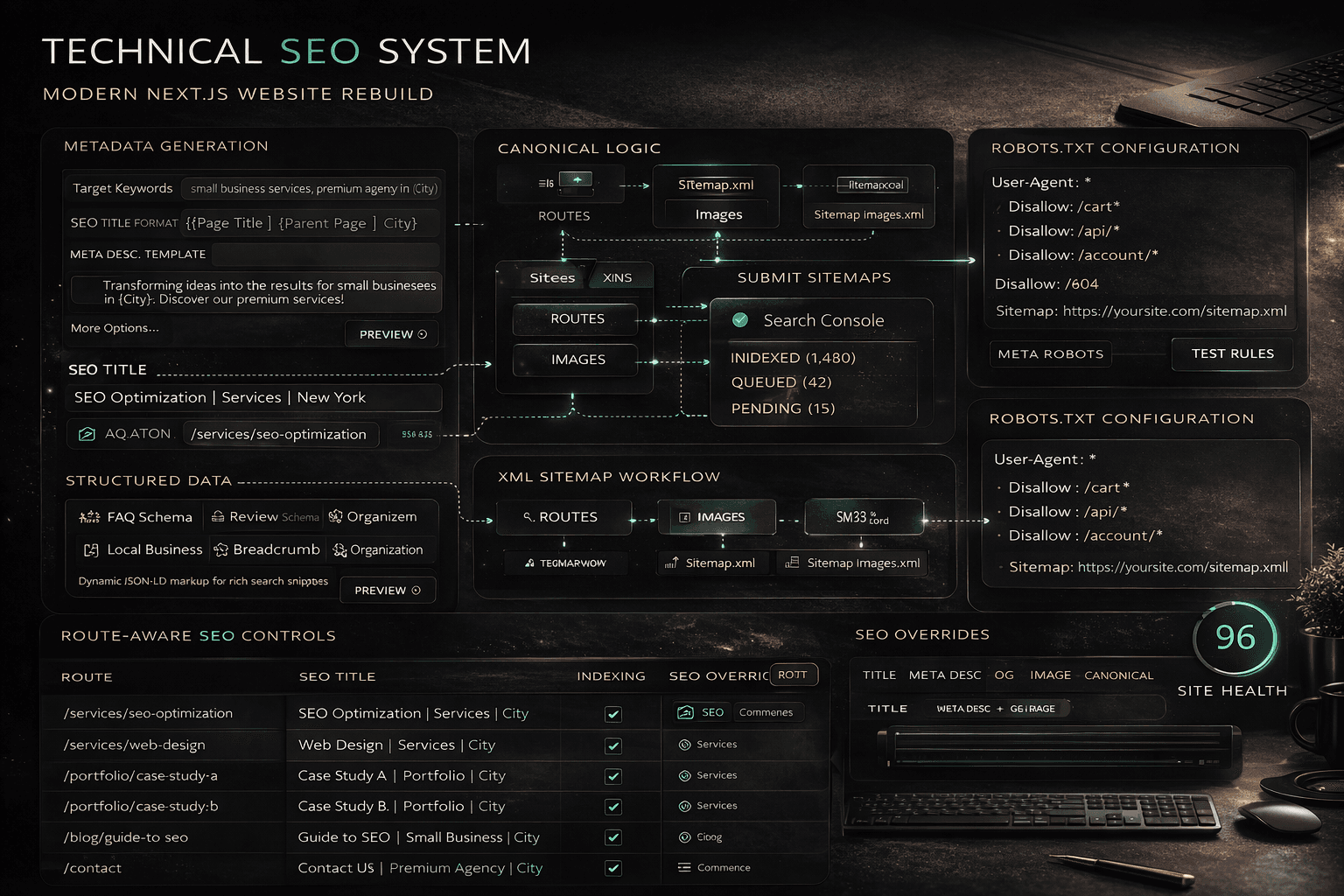
The metadata architecture we wanted from day one
Metadata quality becomes fragile when it depends on manual editing page by page.
We wanted a system that enforced consistency at the template level.
That meant defining:
- page metadata helpers
- canonical URL patterns
- Open Graph defaults
- robots/index rules
- schema generation patterns
This was one of the highest-leverage build decisions in the entire project.
Why?
Because metadata consistency protects three things at once:
- 1search snippet quality
- 2indexation control
- 3launch QA speed
If your titles, descriptions, canonicals, and schema are scattered across isolated templates, every future update becomes riskier.
For migration context, this connected directly to the process explained in SEO Migration Without Losing Traffic.
How we thought about server-rendered content vs client-side behavior
Not everything needs to be interactive.
Not everything should be client-rendered.
One of the best architecture decisions in performance-sensitive websites is deciding what can stay simple.
Our approach:
- keep core meaning server-rendered and crawlable
- use client-side behavior only where interaction genuinely improves UX
- avoid turning critical content into JavaScript dependencies
This helps both performance and SEO.
Examples of content that should stay easy to crawl:
- H1 and supporting copy
- service page structure
- blog article content
- internal links
- FAQ answers
Interactive flourishes can still exist.
They just should not hold the page hostage.
That principle protects discoverability without forcing the site to feel static or lifeless.
The sitemap, robots, and schema decisions were architecture decisions too
Teams often treat these as cleanup.
They are not cleanup.
They are part of the build system.
We wanted crawl assets and structured data to be part of the architecture from the start:
- dynamic `robots.txt`
- dynamic `sitemap.xml`
- route-aware canonical tags
- structured data helpers for commercial and blog pages
This improved two things:
1) Consistency
When SEO assets are generated from the same system as the routes and content, drift is less likely.
2) Freshness
Publishing new pages should not require a separate manual SEO ritual just to keep discovery assets useful.
That is one reason architecture quality matters so much for technical SEO.
Why we avoided unnecessary backend complexity
For this kind of site, more backend does not automatically mean better architecture.
Sometimes it means more moving parts, more failure points, and more maintenance drag.
We avoided adding complexity that the project did not need.
That meant favoring:
- static or mostly-static delivery where appropriate
- route-driven content output
- lightweight utilities for indexing workflows
- simple deployment paths
This kind of restraint matters.
A small business website should not inherit enterprise complexity just because modern tooling makes it possible.
The best architecture is often the one that solves the real business problem with the fewest fragile layers.
The build workflow decision: make quality checks unavoidable
A rebuild is much easier to trust when the build process enforces discipline.
We wanted checks for:
- linting
- type safety
- sitemap integrity
- route validity
- production build success
This matters because launch stress causes shortcuts.
A good build workflow reduces the number of shortcuts that can slip through.
That is not just a developer convenience.
It protects:
- SEO assets
- content templates
- internal links
- deployment confidence
If a broken sitemap or route mismatch can ship silently, the architecture is too forgiving in the wrong places.
The WordPress vs custom Next.js tradeoff, honestly
This is where a lot of teams get stuck.
WordPress is not automatically wrong.
Next.js is not automatically better.
The better question is:
Which option gives this specific project the right balance of speed, flexibility, SEO control, and maintenance cost?
When WordPress may still be the better fit
- the team needs a familiar admin workflow immediately
- frequent non-technical page editing is the top priority
- the project scope is simple and unlikely to evolve much
- the maintenance discipline is strong enough to control plugin sprawl
When a custom Next.js website makes more sense
- performance is a serious priority
- template consistency matters
- SEO systems need tighter control
- the team wants cleaner architecture boundaries
- the site will continue expanding in deliberate ways
This rebuild fit the second case.
That does not make the choice universal.
It makes it appropriate for the project.
The architecture mistakes we wanted to avoid
These were the biggest traps.
Mistake 1: letting visual sections dictate architecture
Layouts change.
The architecture should support page roles, content flow, and discoverability first.
Mistake 2: scattering SEO logic across unrelated files
When metadata, canonicals, and schema are handled inconsistently, QA becomes slower and errors compound.
Mistake 3: making every section interactive by default
Interactivity should be earned.
If it does not improve understanding or action rate, it adds cost.
Mistake 4: overbuilding before content discipline exists
A complicated system does not solve unclear content governance.
It usually hides the problem for a while.
Mistake 5: shipping without a validation routine
If build checks are optional, launch quality becomes optional too.
A practical architecture checklist for your own rebuild
Use this before you commit to a stack or content model.
Routing and structure
- Are commercial pages easy to map by role?
- Will URL structure stay clear after expansion?
- Can crawl assets reflect the real route system cleanly?
SEO systems
- Is metadata generation consistent by template?
- Are canonical rules easy to audit?
- Can blog and service templates generate schema reliably?
Content workflow
- Can the team publish without technical friction?
- Are slugs and frontmatter structured clearly?
- Will internal linking stay manageable over time?
Performance and rendering
- Is critical content crawlable in the HTML output?
- Are client-side effects limited to real UX needs?
- Can the build protect Core Web Vitals instead of reacting later?
Launch and maintenance
- Are validation checks part of the build?
- Can the team debug route, metadata, and crawl issues quickly?
- Will this architecture still feel sane six months from now?
If those answers are weak, the stack decision is not finished.
What changed because of these build decisions
The most important result was not "we used Next.js."
The result was that the rebuild became easier to reason about.
That improved:
- speed and rendering confidence
- metadata consistency
- blog and service template discipline
- crawl asset reliability
- launch-week troubleshooting
This is what good architecture should do.
It should reduce future chaos.
For teams planning their own rebuild, this is the real takeaway:
Choose technical patterns that make quality easier to repeat.
That is how architecture supports rankings, conversions, and calmer launches at the same time.
If you want the practical launch side of that, the next post will matter a lot: Website Launch Checklist for Small Businesses.
Next in the series
Part 7 moves from build decisions to operating discipline:
`07-launch-week-checklist-and-first-7-days`
We will cover the exact launch-week checklist, first-week monitoring routine, and fast-response priorities that help a rebuild go live without turning into a scramble.
FAQ
Why use Next.js for a small business website?
Because it can offer strong performance, clean route control, reusable templates, and predictable SEO handling when the project needs more than a basic theme setup.
Is Next.js always better than WordPress for SEO?
No. SEO results depend more on architecture quality, content strategy, crawlability, and maintenance discipline than on the framework name alone.
What matters most in website architecture for SEO?
Clear routing, consistent metadata, crawlable content, canonical control, strong internal linking, and a sitemap/robots setup that reflects real indexable pages.
Should blog content and commercial pages share one architecture?
Yes, if the system makes internal linking, metadata patterns, and publishing workflow easier to manage consistently.
What is the biggest architecture mistake in a rebuild?
Adding complexity the project does not need, then paying for it later with slower publishing, harder QA, and more fragile launches.
Architecture is not the glamorous part of a rebuild.
But it decides whether the good ideas in strategy, SEO, design, and conversion can actually survive launch and scale after it.
That is why technical decisions are business decisions.
Related reads
- Premium Design Without Slow Pages (Part 5)
- SEO Migration Without Losing Traffic (Part 3)
- J Luxe Website Rebuild Series: 8-Part Announcement
- How to Make Your Website Load Fast
Ready to launch
Launch your website in 48 hours with a done-for-you setup
If this article helped you clarify the next step, the launch offer gives you a mobile-first business website, domain guidance, hosting setup, and a clear CTA flow without dragging the project out.
Chat on WhatsAppWebsite design in 48 hours for businesses that need to go live fast
The 48-hour launch offer is built for businesses that need a clean, mobile-first site live fast with pricing, CTA flow, and basic SEO already handled.
See the done-for-you website launchRelated posts
More articles to help you get better rankings and more leads.
Part 5 of the J Luxe rebuild series: how to combine premium website design, Core Web Vitals, and conversion-focused UX without sacrificing speed or SEO performance.
Part 3 of the J Luxe series: use this SEO migration checklist to protect organic traffic with 301 redirects, canonical tags, and launch QA.
An 8-part series on rebuilding jluxemedicalaesthetics.com, covering SEO migration, service page conversion, launch strategy, and Next.js architecture decisions.